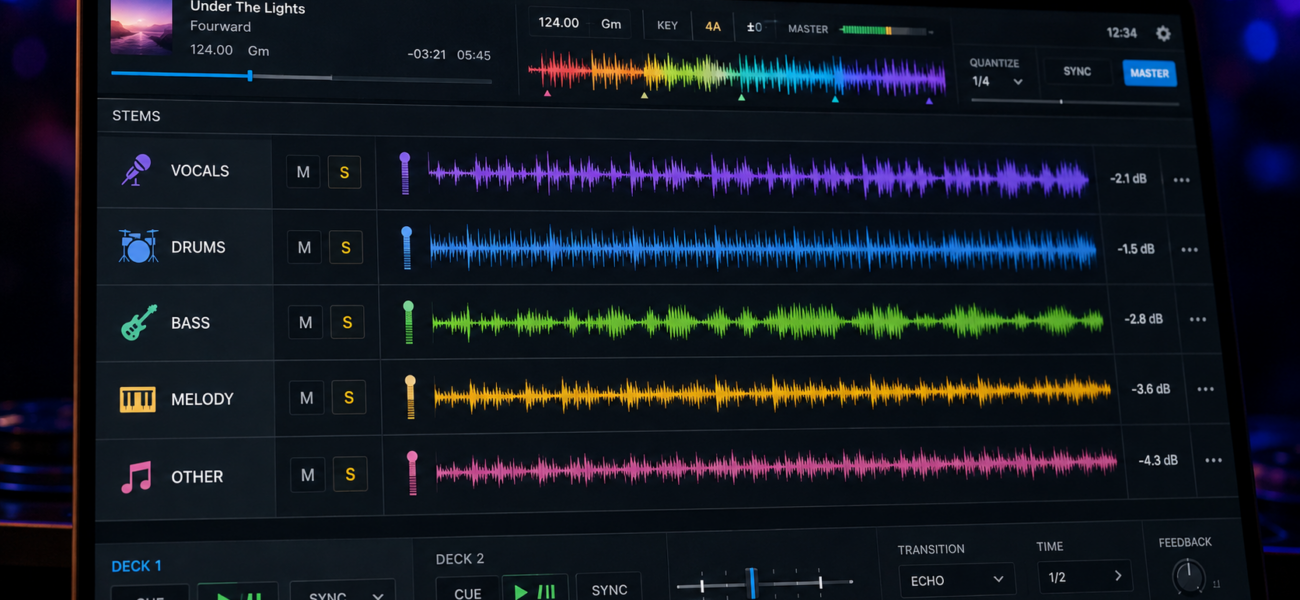
Stems are one of the most significant developments in DJ technology in the last decade. The ability to separate a track into its individual components — drums, bass, melody, vocals — and mix those elements independently opens up creative possibilities that simply didn’t exist before. Here’s what stems are, how they work, and how to use them without turning your set into a technical exercise nobody asked for.
What Are Stems?
A stem is an isolated component of a track. Separate a song into stems and you get four independent audio signals: the drums, the bass, the melodic/harmonic content, and the vocals. Each stem can be played, muted, or volume-adjusted independently of the others — in real time, during a live performance.
Stems are generated in two ways: through AI separation (software analyzes a stereo track and attempts to isolate each element) or through official stem releases (the label provides the separated elements as separate files). AI separation is available in most current DJ software and is good enough for most performance uses.
Where Stems Live in Your DJ Software
Native Instruments has supported stems the longest. Traktor’s Stem Deck mode plays four-channel stem files and gives you independent volume control over each element. The most mature stem implementation available.
djay Pro uses AI to separate any track into stems in real time — no special file format required. The Neural Mix feature gives you four faders (drums, bass, melody, vocals) on any track in your library. Works on iPad, iPhone, and Mac.
Virtual DJ’s AI stem separation works similarly to djay Pro — real-time separation on any track. Available as part of the standard Virtual DJ subscription.
Serato added AI stem separation in 2024. Available on compatible hardware. Gives you mute buttons for drums, bass, melody, and vocals on each deck.
The 5 Most Useful Stem Techniques
1. The Vocal Swap
Two tracks are playing simultaneously. Mute the vocals on the outgoing track and bring up the vocals on the incoming track — without changing the instrumental mix underneath. The crowd hears a smooth transition from one vocal to the next, over a continuous bed of music. This technique is particularly powerful when two tracks share similar keys or BPMs — the vocal is the element that changes while the music remains constant.
2. The Bass Blend
The traditional bass swap (cutting bass EQ on one track while boosting the other) requires careful timing and EQ work. With stems, you simply fade out the bass stem on the outgoing track and fade in the bass stem on the incoming track — independently of everything else. The result is a cleaner, more precise bass transition than EQ alone can achieve.
3. Drum-Only Intro
Bring a new track into the mix with only its drum stem — vocals, bass, and melody muted. The crowd hears a new rhythm arrive. Over 8–16 bars, gradually unmute the bass, then the melody, then the vocals. The track builds from nothing to full energy in a way that feels like a proper DJ edit without you ever having to edit the track.
4. A Cappella Over Instrumental
Previously this required owning separate a cappella and instrumental files from your record pool. With stems, you can isolate the vocals of any track and play them over the instrumental of any other — in real time. This opens up mashup possibilities without the preparation of traditional blending techniques.
5. Drum Loop Extension
The track is ending but you’re not ready to transition. Mute everything except the drums, loop the drum stem for 8–16 bars, and use that rhythmic foundation to bring in your next track cleanly. The crowd stays rhythmically engaged while you execute a measured transition under the drum loop.
The Quality Problem with AI Stems
AI stem separation is good — but it’s not perfect. Here’s what to expect:
- Bleed — some vocal frequencies appear in the “melody” stem, some bass frequencies bleed into the “drums” stem. The separation is not surgical.
- Artifacts — at high separation settings, some stems develop audio artifacts — a slightly phased or hollow quality. More noticeable on complex productions than on simple ones.
- Genre variation — stems work best on tracks with clear separation between elements (modern pop, hip-hop, R&B). Dense electronic music with heavy layering produces less clean separation.
The practical implication: test stem separation on a track before using it in a live performance. Some tracks separate beautifully; others produce results you wouldn’t want through a club PA.
The temptation with stems is to do too much — constantly muting and unmuting elements, creating a complex real-time remix that takes your full attention. The crowd doesn’t want to watch you operate software. Use stems for 2–3 specific moments per set where they genuinely enhance the music, then let the tracks play. Stems as a constant feature of every transition is stems as a gimmick.
Stems vs Traditional A Cappellas and Instrumentals
| Factor | AI Stems | Record Pool A Cappellas/Instrumentals |
|---|---|---|
| Track availability | Any track in your library | Only tracks where the label released a version |
| Audio quality | Good — some artifacts | Perfect — official release quality |
| Preparation required | None — real-time | Pre-download and organize in advance |
| Control granularity | 4 independent stems | Vocal only or instrumental only |
| Reliability live | Generally good | 100% — standard audio file |
The verdict: use AI stems for flexibility and spontaneity. Use record pool a cappellas and instrumentals for mission-critical moments where audio quality cannot be compromised — like a key mashup you do every set.
Frequently Asked Questions
Do I need special hardware to use stems?
You need software that supports stem separation (djay Pro, Traktor, Serato, Virtual DJ) and hardware compatible with that software. Most modern DJ controllers work — check your software’s hardware compatibility list. Some stem features require more CPU power than older laptops can provide; test at home before relying on stems at a live gig.
Can I use stems with Pioneer CDJs?
Not currently in the traditional CDJ workflow. Pioneer’s CDJ ecosystem doesn’t natively support real-time AI stem separation. DVS setups (Serato or Traktor with timecode) can access software stem features through a laptop at a CDJ-equipped booth, but the workflow is more complex.
Are stems replacing traditional DJing skills?
No. Stems are an additional creative tool — they don’t replace beatmatching, crowd reading, track selection, or set structure. A DJ who can’t read a room still can’t read a room with stems. The fundamentals remain the fundamentals. Stems are one more thing a skilled DJ can add to their toolkit, not a shortcut around developing the fundamentals.
320kbps Source Files for Cleaner Stem Separation
AI stem separation produces cleaner results from higher-quality source files. MyMP3Pool’s 320kbps downloads give the AI algorithm more frequency information to work with.
Visit MyMP3Pool →
ⓘ Affiliate link — we may earn a commission at no extra cost to you
The Best DJ Record Pool We've Tested
After independently reviewing every major record pool, mp3poolonline.com consistently comes out on top for catalog size, audio quality, new release speed, and price.
Visit mp3poolonline.com →ⓘ Affiliate link — we may earn a commission at no extra cost to you