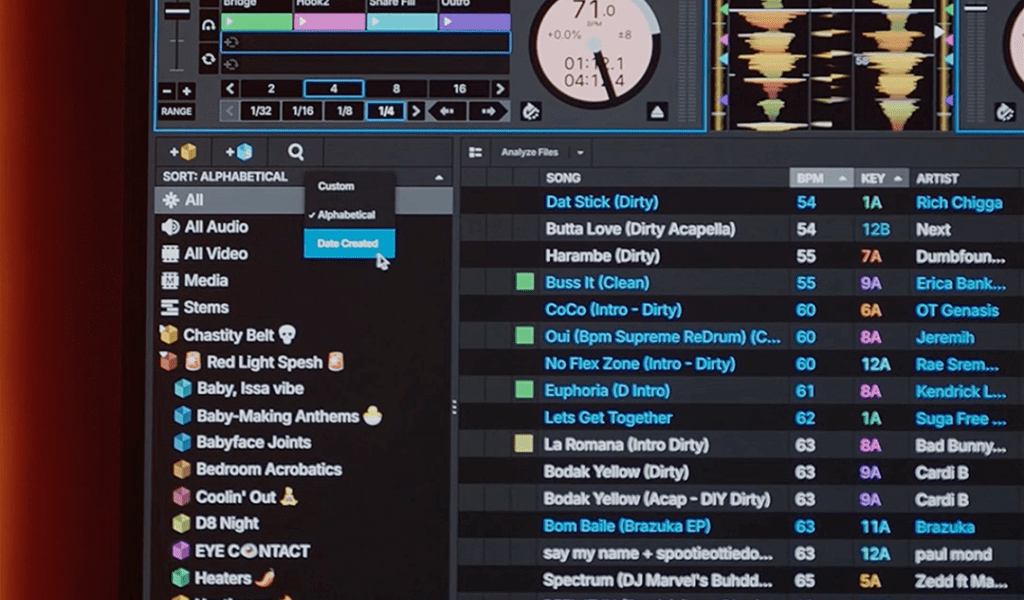
Starting a DJ library from zero is one of the most overwhelming parts of learning to DJ. Where do you even begin? You need thousands of tracks but you have none. You need to know what to download but you haven’t developed taste yet. You need an organized system but you don’t know what organization you’ll need. Here’s the complete process for building a professional DJ library from scratch — in the right order.
Step 1: Get Your Source Right First
Before you download a single track, decide where your music is coming from. This decision affects everything downstream — file quality, legal standing, metadata consistency, and how much time you spend managing files vs actually learning to DJ.
The right answer for any serious DJ is a record pool subscription. For $15–20/month you get unlimited access to hundreds of thousands of tracks at 320kbps, properly tagged, with every DJ-specific version (extended mixes, clean edits, a cappellas). This is not a luxury — it’s the only way to build a library that works professionally without spending years and thousands of dollars doing it track by track.
Don’t start with random downloads from various sources. You’ll spend years untangling inconsistent file naming, missing metadata, variable quality, and tracks you don’t have the right to perform commercially.
Step 2: Choose Your DJ Software and Stick to It
Your DJ software is your library’s home. Pick one — rekordbox, Serato DJ Pro, or Traktor — and commit. Splitting your library across two platforms creates organizational headaches that compound over time. Every track you add will be analyzed, tagged with cue points, and stored in your chosen software’s database. Changing later means migrating everything.
For most beginners aiming at club work: start with rekordbox. The free tier handles full library management and USB export to Pioneer CDJs. It’s the industry-standard platform and the most useful one to know inside out.
Step 3: Start With Depth in One Genre
The biggest mistake new DJs make when building a library is trying to cover everything immediately. They download 50 hip-hop tracks, 50 house tracks, 50 pop tracks, and end up with a shallow, disconnected collection that doesn’t serve any genre well.
Instead: pick your primary genre and go deep. If you want to be a hip-hop DJ, spend your first two months downloading 200–300 hip-hop tracks spanning the last 10 years. Learn what’s in your library. Understand the catalog. Know which tracks work together. Depth beats breadth at every stage of DJ development.
Expand to secondary genres once you have genuine depth in your primary one — not before.
Step 4: The First 100 Tracks
Your first 100 tracks should cover these bases:
Proven Classics (30 tracks)
The undeniable records in your genre that have proven dancefloor impact across years. These are your safety net — tracks you know will work when you need them most.
Current Releases (30 tracks)
The last 6–12 months of new music in your genre. What’s getting played in clubs and on radio right now. Download from your record pool weekly to stay current.
Crossover / Transition Tracks (20 tracks)
Tracks that bridge between your genre and adjacent ones. These give you flexibility to move the set in different directions without a jarring transition.
Personal Favourites (20 tracks)
Tracks you genuinely love that may not fit obvious categories. Your personal taste should be in your library — it’s what makes your sets distinct from every other DJ playing the same genres.
Step 5: Set Up Your Folder Structure Before You Import Anything
The worst time to organize a library is after it’s already large and messy. Set up your folder structure before you start importing. Here’s a system that scales:
Everything lives under /DJ Music/ on a dedicated drive. Never mix DJ tracks with personal listening music — they have different quality standards and organization needs.
/DJ Music/00 Inbox/ — everything downloaded goes here first. Process (listen, tag, organize) before moving to your permanent folders. This prevents your library from filling with unreviewed tracks.
/DJ Music/Hip-Hop/, /DJ Music/House/, /DJ Music/R&B/ etc. Keep genre folders broad — don’t create sub-genre folders until you have enough tracks in a genre to justify it (100+ tracks).
Use rekordbox or Serato playlists for fine-grained organization — by energy level, by BPM range, by gig type. Playlists are flexible and don’t require moving files. Your folder structure is just the physical file organization; your software playlists are how you actually navigate during performance.
Step 6: The Weekly Maintenance Routine
A library that grows without maintenance becomes unusable. Set aside 30–45 minutes every week for library work:
Download and Process New Releases
Check your record pool for new releases in your genre. Download what’s relevant. Listen to everything in your Inbox folder. Keep what works, delete what doesn’t. Move keepers to their genre folders.
Analyze and Tag
Run analysis on all new tracks in your DJ software — BPM, key, waveform. Fix any analysis errors manually. Check that metadata (artist, title, genre) is correct. Consistent metadata makes searching fast under pressure.
Set Cue Points on Key Tracks
Every track you’re likely to play at a gig needs a minimum of two cue points — a mix-in point and a warning marker. Do this in your weekly session, not in the booth the night of a gig.
Update Playlists
Add new tracks to relevant playlists. Remove tracks that aren’t working from active rotation playlists. Keep your playlists reflecting what you’d actually play, not everything you’ve ever downloaded.
How Many Tracks Do You Actually Need?
| Stage | Library Size | What It Covers |
|---|---|---|
| Starting out | 100–300 tracks | Practice sessions, small events, single genre |
| First gigs | 300–800 tracks | 2–3 hour sets with some genre flexibility |
| Regular gigging | 800–3,000 tracks | Multiple genres, 4+ hour sets, most requests covered |
| Professional | 3,000–10,000+ tracks | Any genre, any era, any request, any crowd type |
A curated library of 500 tracks you know deeply will outperform a bloated library of 5,000 tracks you barely know. The DJ who can navigate their library instantly and knows exactly what every track sounds like is more dangerous than the DJ with twice as many files they’ve never properly listened to. Know your library. Every track.
Frequently Asked Questions
How long does it take to build a usable DJ library?
With a record pool subscription and consistent weekly effort, you can have a solid working library of 500–800 tracks in 2–3 months. A truly comprehensive multi-genre professional library takes 2–3 years of consistent downloading, listening, and curation. There’s no shortcut — the library grows with your taste and experience.
Should I delete tracks I never play?
Yes — regularly. A library full of tracks you’d never actually play in a real set slows down navigation and creates decision fatigue. Keep your active rotation tight and well-curated. Archive tracks you’re not currently playing but want to keep in a separate folder rather than deleting permanently.
How do I handle duplicate tracks?
Keep intentional duplicates — you might legitimately want both the clean edit and the explicit version. Delete accidental duplicates (same version downloaded twice) using your DJ software’s duplicate finder or a tool like Duplicate Cleaner. Duplicates waste storage and create confusion when searching under pressure.
200,000+ Tracks, One Subscription
MyMP3Pool is the fastest way to build a professional DJ library — unlimited 320kbps downloads across every genre, properly tagged and ready to import.
Visit MyMP3Pool →
ⓘ Affiliate link — we may earn a commission at no extra cost to you
The Best DJ Record Pool We've Tested
After independently reviewing every major record pool, mp3poolonline.com consistently comes out on top for catalog size, audio quality, new release speed, and price.
Visit mp3poolonline.com →ⓘ Affiliate link — we may earn a commission at no extra cost to you