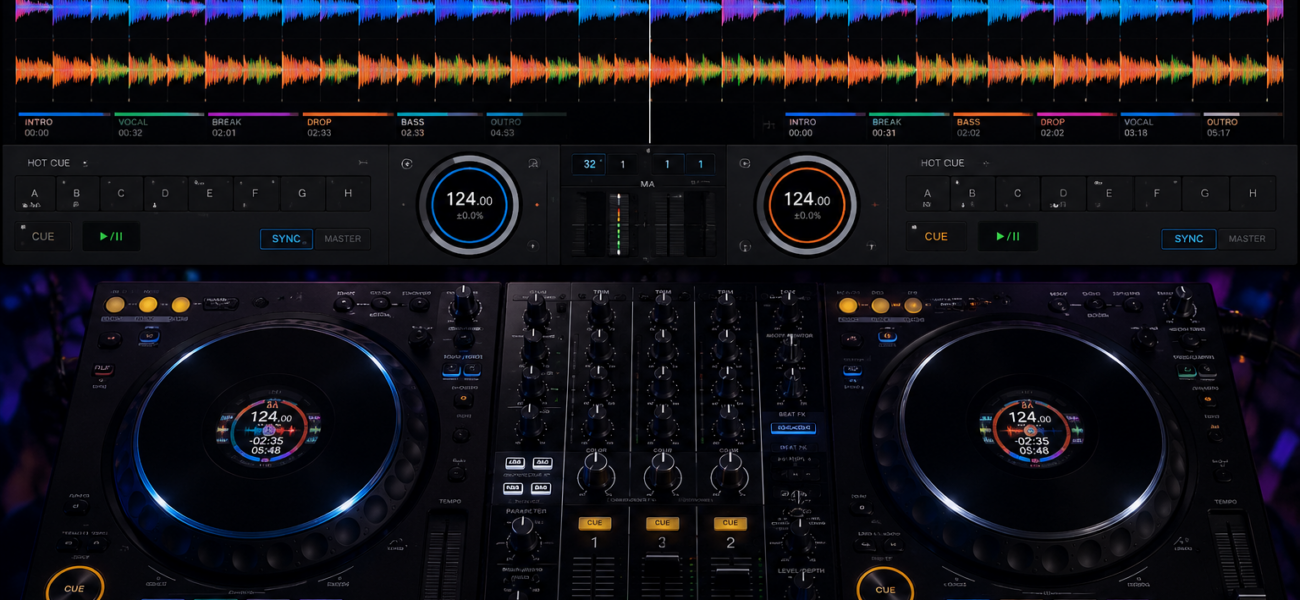
Beatmatching is the foundation of DJ technique. It’s the skill of getting two tracks to play in perfect rhythmic sync so you can blend them together without a jarring clash of beats. Every other DJ skill — EQ work, genre transitions, crowd reading — is built on top of this. Here’s how to learn it properly.
What Is Beatmatching?
When two tracks are beatmatched, their beats align perfectly so they play in sync. The goal is to match two things simultaneously:
- BPM (tempo) — both tracks running at exactly the same speed
- Phase (beat alignment) — the beats landing at exactly the same moment, not slightly offset
Get both right and the two tracks play together seamlessly. Get either one wrong and you get a trainwreck — beats clashing against each other in an unpleasant rhythmic mess.
The Manual Beatmatching Method
Modern DJ software has a sync button that beatmatches automatically. Using it is perfectly legitimate — we’ll address the sync debate shortly. But understanding manual beatmatching makes you a better DJ regardless, because it gives you the ability to fix problems that sync can’t solve.
Set the incoming track’s cue point at the first beat of a bar — typically the first kick drum hit. This is the point the track will start from when you release it. Use headphones to monitor the incoming track while the outgoing track plays through the speakers.
Use the pitch fader on your controller or CDJ to adjust the BPM of the incoming track to match the playing track. Listen in your headphones. If the incoming track is running faster than the playing track, the beats will pull ahead — slow it down slightly. If it’s running behind, speed it up. Make small adjustments — large pitch changes create audible pitch shifts.
With BPM roughly matched, wait for the “1” of a 4-beat bar in the playing track — usually easy to hear as the kick drum that starts a new phrase. Release the incoming track at exactly that moment. The goal is to have both kicks land at the same time.
Even with BPM matched, the beats may land slightly offset (this is called being “out of phase”). Listen for the “flam” sound — two beats that are nearly but not quite simultaneous. If the incoming track is slightly ahead of the beat, hold the jog wheel briefly to slow it back. If it’s behind, tap the jog wheel forward. Make small nudges, not large grabs.
Even perfectly matched tracks will drift over time due to tiny BPM differences measured in fractions of a percent. Listen continuously in your headphones and make micro-adjustments to the pitch fader to keep the tracks in sync. The goal is to maintain alignment for at least 32 bars — the typical length of a clean mix.
At a natural phrase boundary (every 8 or 16 bars), gradually bring the incoming track up on the mixer using the channel fader or crossfader. Use EQ — specifically the bass — to prevent two kick drums playing simultaneously. Bring the outgoing track down as the incoming track builds.
The Sync Button: Honest Take
Using the sync button is not cheating. Professional DJs use it. The argument against sync isn’t moral — it’s practical. Sync doesn’t fix phase drift on live recordings, can’t handle tracks with variable BPM, and can’t save you when it goes wrong mid-mix. Understanding manual beatmatching means you can recover from sync failures. That’s the only real reason to learn it manually.
The recommended approach: use sync as your primary tool during normal performance, but turn it off once a week during practice to maintain and build your manual skills. This keeps your ear sharp for the situations where sync fails.
Using the Waveform Display
All DJ software shows waveforms for both tracks simultaneously. When two tracks are beatmatched, the waveforms align vertically and move at the same speed. This visual feedback makes learning beatmatching significantly faster than using your ears alone.
Look for:
- Aligned kick drum peaks — the vertical spikes in the waveform should line up when the tracks are in sync
- Matching speed — if one waveform is moving noticeably faster than the other, the BPMs aren’t matched
- Phase offset — if the peaks are consistently ahead or behind each other, the tracks are out of phase even if the BPM is correct
Common Beatmatching Mistakes
Matching BPM but not phase. The beats will clash on every bar even if the speed is right. BPM alone isn’t enough — you need both BPM and phase aligned.
Not monitoring in headphones before bringing the track up. You cannot beatmatch by watching a screen alone. You must listen to both tracks simultaneously in your headphones before opening the fader.
Making large pitch adjustments. Moving the pitch fader significantly causes an audible pitch change on the track. Always use small, incremental movements and allow time for the effect to be heard before adjusting again.
Releasing the track at the wrong beat. Always release on the “1” of a bar — the downbeat. Releasing on beat 2, 3, or 4 puts you out of phrase with the playing track and the mix will feel structurally wrong even if the beats align.
Rushing the mix. Give yourself time. Start monitoring the incoming track in headphones at least 32 bars before you want to bring it up. Trying to beatmatch at the last second leaves no room for correction.
How to Practice Beatmatching
Use Sync — Learn the Workflow
Get comfortable with the layout of your controller, the cue/play workflow, the EQ, and the channel faders. Don’t fight the technical fundamentals while also trying to learn manual beatmatching. Master the workflow first.
Turn Sync Off — Same BPM Tracks
Find two tracks with the same BPM and practice matching them manually. Same BPM tracks are easier because you don’t need to adjust the pitch fader — just align the phase. This isolates the hardest part of manual beatmatching.
Different BPM Tracks
Now practice with tracks at different BPMs — 2–4 BPM apart first, then larger differences. You’ll need to use the pitch fader to match speeds before aligning phase. This is full manual beatmatching.
One Manual Session Per Week
Once you’re proficient, maintain the skill with one 30-minute manual-only practice session per week. Use sync the rest of the time. Your ear stays calibrated and you can fix sync failures when they happen live.
Beatmatching vs Phrase Matching
Beatmatching gets the beats to align. Phrase matching gets the musical structure to align — mixing at the start of a new section rather than mid-verse. Both are required for a mix that sounds musically correct.
Most tracks are structured in 4-bar and 8-bar phrases, with major sections changing every 16 or 32 bars. Always try to bring a new track in at the beginning of one of these structural boundaries — a new verse, a drop, or a chorus. Bringing a track in mid-phrase sounds abrupt and disconnected even when the beats are perfectly aligned.
Frequently Asked Questions
How long does it take to learn to beatmatch manually?
Most people can match two tracks manually at a basic level within 2–4 weeks of daily 30-minute practice sessions. Getting good at it — clean, confident, quick matching under pressure — takes 3–6 months of consistent practice. Don’t measure progress in days. Measure it in gigs.
Is beatmatching harder on vinyl?
Yes, significantly. Vinyl has no pitch display, no waveform, and the pitch fader controls are less precise than digital. Most DJs learning today start on digital controllers, which is the right call. Vinyl beatmatching is a separate skill worth learning eventually, but start digital.
Do professional DJs use the sync button?
Yes. Most professional club DJs use sync for the majority of their mixing. The skill is knowing when sync has failed and how to fix it manually — which requires understanding manual beatmatching. Think of it like a professional driver who uses cruise control on the highway but knows how to drive manually when conditions require it.
What’s the best BPM range to start practicing with?
Start with tracks between 120–128 BPM — most house and pop music lives here. The tempo is fast enough to make the beat obvious but not so fast it’s hard to count. Once comfortable, expand to hip-hop (85–100 BPM) and faster EDM (130–145 BPM).
Build Your Practice Library
The best way to practice beatmatching is with properly tagged, consistent-BPM tracks. MyMP3Pool delivers 320kbps files with BPM metadata already embedded.
Visit MyMP3Pool →
ⓘ Affiliate link — we may earn a commission at no extra cost to you
The Best DJ Record Pool We've Tested
After independently reviewing every major record pool, mp3poolonline.com consistently comes out on top for catalog size, audio quality, new release speed, and price.
Visit mp3poolonline.com →ⓘ Affiliate link — we may earn a commission at no extra cost to you